Product · Operations Platform for Installer Businesses

Run your solar & battery business on Waveform.

Waveform is the operations platform WAVhz builds for installer teams. Leads and appointments, roof design, tariffs and prices, quotes, proposals and subsidy claims sit in one guided path, and an AI assistant that can carry a job through it for you. It's built for your business, not your homeowners.

Try it out See it in action
waveform.wavhz.com/forms
Ask the assistant to set something up…Send
18 hrs → 2 hrsadmin per job, sale to finished install
“WAVhz were instrumental in turning my blueprint into reality — wrapping security and immutable records around it and delivering it as a full CRM.”
Simon Peat, former CEO, Project Better Energy — on Project Solar UK’s jobs

Design the real roof — not a rectangle

Solar planning is a guided rooftop solar designer, linked to every customer and quote. It finds the building, reads the roof from an aerial height survey, places panels to the local rules, works out each panel's yearly output with shading, wires the system and names the grid route — every design checked against the standards of the country the house is in.

waveform.wavhz.com/solar/planner
Ask the assistant, or hand it a job…Send
🤝

Hand it the design

You draw the building outline and the roof sections. The assistant places the panels, sizes the system to the customer's bill, picks equipment that fits, wires it, chooses the tariff and builds the priced quote — then stops so you can review. (India today; in Australia and the UK it designs from the mapped building by itself.)

❓

It asks, it doesn't guess

Whether the customer wants backup before it adds a battery; which way to go when a choice breaks a design rule, with only the options that follow the rules. Never a guessed address or building.

✋

Take over at any time

“Let the assistant carry on” on any design hands it over from wherever you are; Stop takes it back. At the end it sums up what it chose and why, and every choice can be changed.
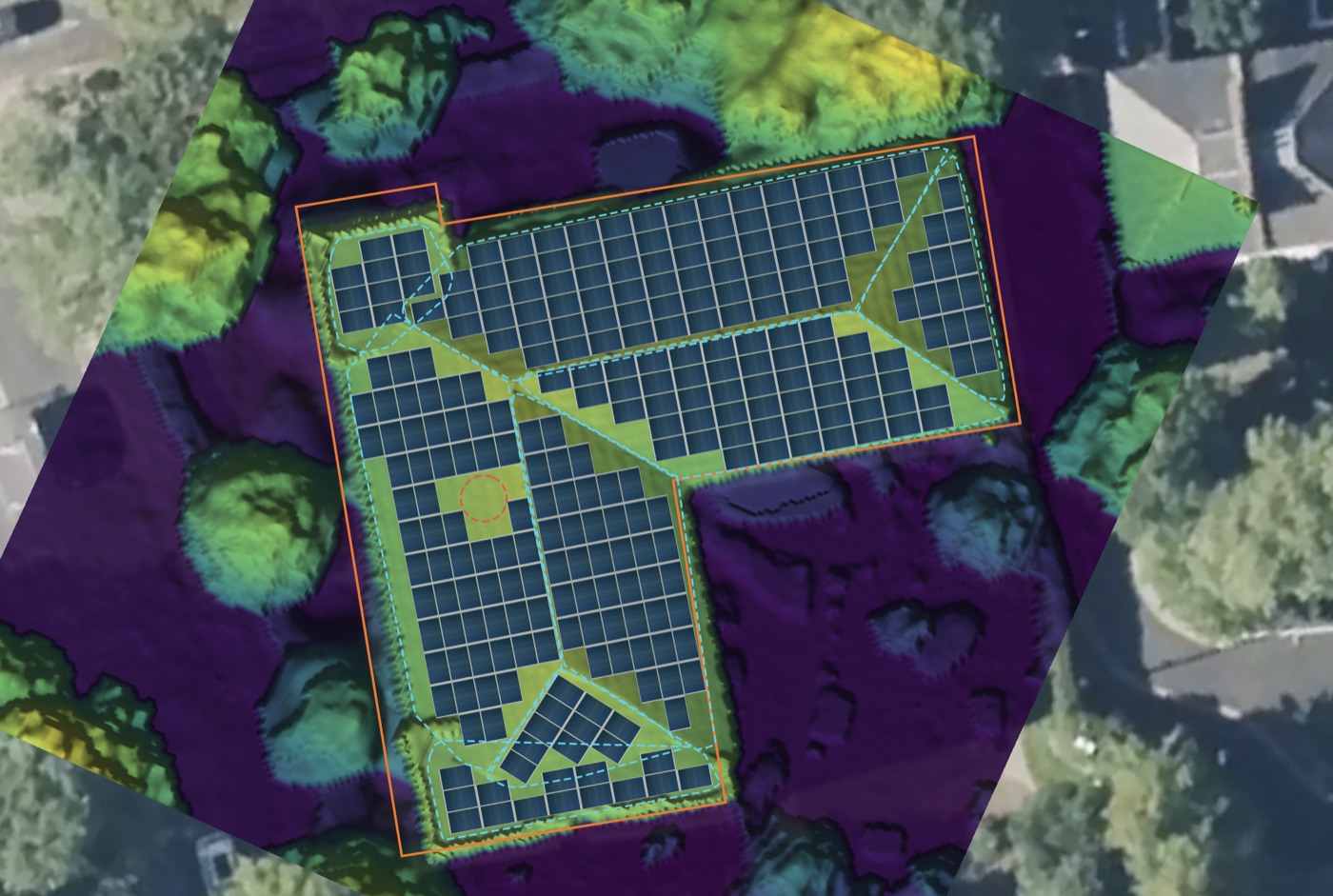
waveform.wavhz.com/solar/planner
The Waveform 2D design map: an L-shaped building with its building boundary in orange, seven roof sections coloured by their yield against the ideal roof, panels placed and wired on each, and the surrounding trees mapped for shading
◆
Hipped roof ▾
7 roof sections · wired
Each section's yield against the ideal roof
Layers
Building Boundary
Panel Zones
Wiring
Generation potential
Trees
7 roof sections
  • 🧭
    A guided design, start to finishGuided steps do the work and stop only for your decisions: the building, the roof, the obstacles, a check of the roof sections, placement and output, the battery, wiring, then the final review. Change anything by hand at any point, with undo and a full history.
  • 🏠
    The real roof, read from the airAn aerial height survey gives each roof section its pitch, facing and size, and finds chimneys, vents and raised rooflights. No survey? Describe the roof in a click or two — hip, gable, half-hip, Dutch gable, lean-to or flat — and shared walls with neighbours are found for you.
  • ✂️
    Obstacles confirmed before a panel goes onRoof windows and existing panels spotted in the survey photo are put to you one by one. Add no-panel zones and trees at any stage, and the design re-lays itself around them.
  • 📐
    Placement by the rulesEvery roof section gets as many panels as the local clearances allow. If a later change breaks a rule, the affected panels are re-laid or removed automatically — with Undo.
  • 🌳
    Shading, panel by panelEach panel's skyline is built from nearby trees, buildings and the roof itself, using the MCS shade-factor method — mirrored correctly for sites south of the equator.
  • 📊
    Yield against the ideal roofYearly and month-by-month output from long-term irradiance records, per roof plane. Every section is compared with the site's own ideal roof, and weak sections are suggested for dropping — never removed without your say.
  • 🔌
    Wiring, done for youStrings sized for the coldest morning and the inverter's limits, the best-fit inverter picked for you to change, and cables, fuses, isolators, surge protection and RCDs sized per country. Works with string inverters, optimisers and microinverters.
  • ⚡
    The grid route, worked outEach design gets its connection route and forms: G98, the G99 fast tracks or a full application in Great Britain; G98/NI or G99/NI in Northern Ireland; NC6 or NC7 in Ireland; network export limits in Australia and New Zealand.
  • 📄
    Paperwork ready for siteSingle-line diagram, string layout, bill of materials, label set and a pre-filled test sheet, plus a CAD (DXF) export and a seven-tab report with a "to confirm on site" list.
  • 🔆
    2D and 3D on one pageSwitch views without losing your place, orbit the roof in 3D and play the sun across the day to watch shadows from trees and neighbours move over the panels.
  • 💡
    Sized to the billStart from the customer's electricity bill: the system is sized to what they use, never above the connection's sanctioned load or a scheme's cap — or fill the roof, your choice.
  • 🔋
    Battery and inverter, placed for youThe best-fit battery is suggested from the inverter and the customer's backup needs, and both are placed on the best wall for the wiring — shown on the map and in 3D.
  • 🏷️
    Real equipment cataloguePanels, inverters and batteries from Wavhz's library or your own, each with its datasheet figures, priced from your price book — not a placeholder figure.
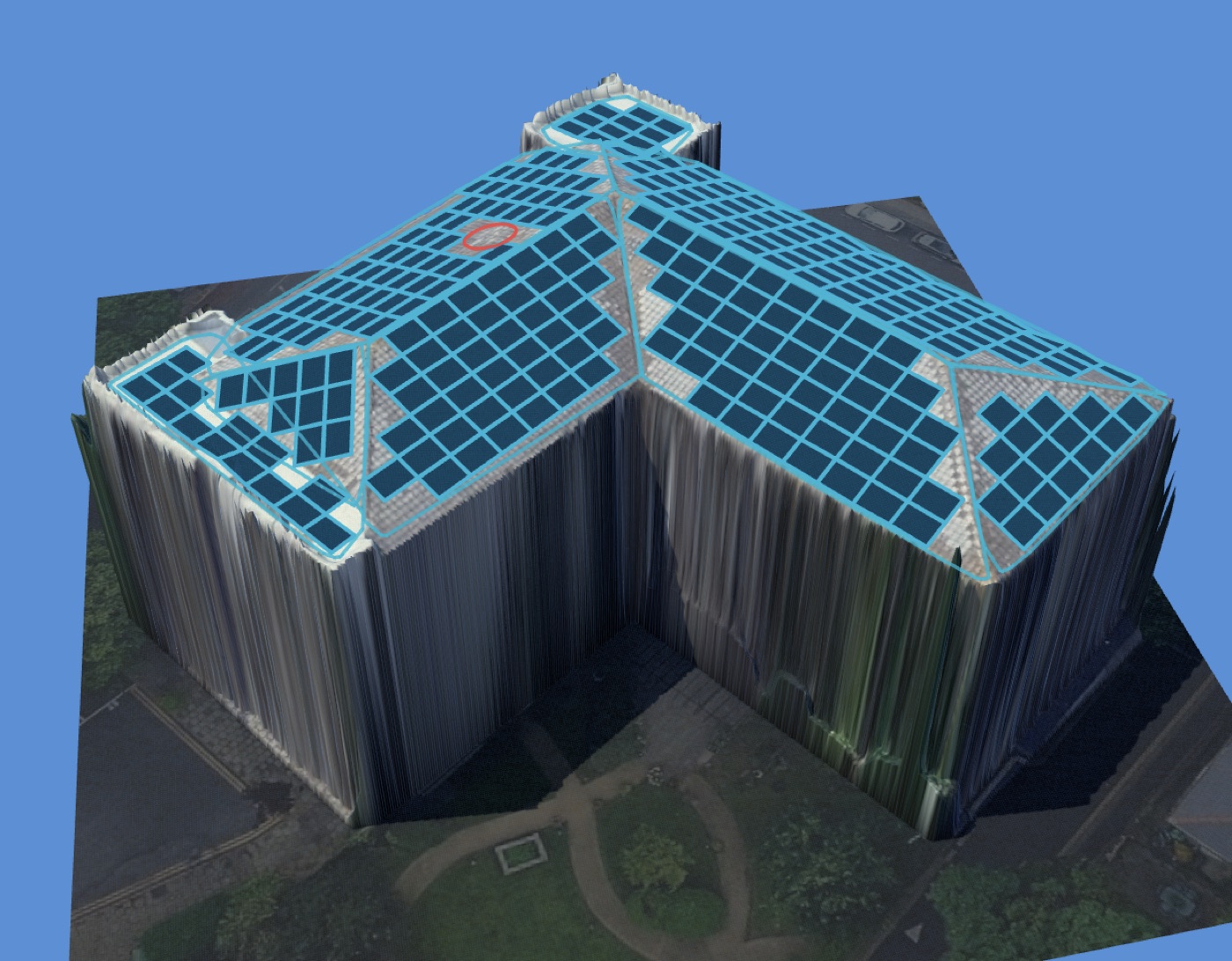
waveform.wavhz.com/solar/planner · 3D view
The Waveform 3D design view: an L-shaped house with solar panels on every roof section, each section coloured by its yield, an inverter and battery on the wall, with the design summary and month-by-month generation cards

Every design in 3D: each roof section shaded by its yield against the ideal roof, the battery and inverter on the wall they will hang on, and the sun played across the day.

Designed to the rules where you install

The standard is chosen from the site's location, and every check names its clause and its basis — an MCS or scheme rule, a regulation, a manufacturer limit, industry practice or cost. Every key value can be adjusted, and each change is flagged as changed, below the standard's minimum, or to confirm locally.

Supported today, with more countries on the way — we’re working on them now. Until then, sites elsewhere are designed to international (IEC) rules.

🇬🇧 Great Britain

MCS MIS 3002 and MCS 012 · BS 7671 Section 712 · ENA G98 and G99 Issue 2 routes — G98, SGI-1/2/3, Form A1-1 or a full application, with phase imbalance up to 32 A · G100 export limitation only where the route needs it · BS 7671 labels · BS EN 62446-1 test sheet.

Every design is a preliminary design: the planner applies these standards and names each rule, and your competent person checks and signs off before installation. It does not certify an installation.

How Waveform works

Every job follows one guided path — Next steps — from the first enquiry to the subsidy claim. Each step says what it needs and does what it can by itself, so nothing falls through the cracks.

1

Lead & appointment

Book the visit, assign the nearest free rep by zone, and let the customer confirm by email. A sale hands the lead straight to quoting.

2

Customer & bill

Add the customer, or start from their electricity bill: the network, usage, connection and address are read for you to tick.

3

Design the roof

Find the building, design the roof in 2D and 3D, size the system, place the battery and inverter, and wire it — or hand it to the assistant.

4

Tariff & savings

Use the customer's real tariff — an AER plan in Australia, the DISCOM's published order in India — adopted in one click, with savings worked out bill by bill.

5

Prices & quote

Price the design from your price book, add subsidies and incentives, and the quote fills itself: system, savings, payback and what the customer pays.

6

Proposal & signature

Issue a proposal that can't change after it's sent, emailed with your branding. The customer reads it, accepts and signs online.

7

Install & claim

Track the job to switch-on, then start the STC claim (Australia) or the PM Surya Ghar application (India) filled from the job.

Campaigns, designed and tracked in one place

Pick the audience from your own customers, design the email, schedule it, and see who opened and clicked. The assistant builds the list and the draft; you check it and press send.

waveform.wavhz.com/communication
Ask about your customers or campaigns…Send
👥

Audiences from your data

Lists built from your customers, quotes and jobs, with unsubscribes respected and every contact's history kept.

🎨

Campaign designer

Brand-safe templates and an email editor, previewed as your customers will see them, with attachments sent as download links.

📈

Tracking that's real

Delivered, opened, clicked and bounced for every campaign and contact, straight from the mail provider's events.

Your documents, filled in and filed

Reports are HTML templates with blanks that fill themselves from each job — quote summaries, proposals, survey reports, with your logo. Every file has its place, and the assistant can find it.

waveform.wavhz.com/reports
Ask for a report or a file…Send
📄

Report templates

Start from your country's proposal, quote summary or survey report, or bring your own HTML. Print or save as PDF from any job.

🗂️

My files & Team files

Folders for every customer, sharing with your team, links for customers to drop files in, and any file picked straight into an upload.

🔒

Kept where they belong

Files follow the same roles as the rest of Waveform, and links can expire or be switched off at any time.

Built for your team. Simple for your customers.

Waveform is a B2B tool — your sales, survey, and install team use it every day, each with a role that decides what they see. Your customers never log in; they just get a fast, accurate quote.

waveform.wavhz.com/users
Ask about your team…Send
Your team, in Waveform

Sales, survey & install staff

  • Book leads and appointments, and keep every customer in one record
  • Design systems and build quotes — or hand them to the assistant
  • Issue proposals and see when they're accepted and signed
  • Move jobs through to switch-on and the subsidy claim
Your customer's experience

Homeowners & end customers

  • Confirm their appointment with one tap
  • Get a tailored proposal by email, then accept and sign it online
  • No account, login, or app required
  • Your team stays the single point of contact

Runs your whole operation

Beyond quotes and pipeline tracking, Waveform configures to how your business actually works.

🗂️

Customer Management

Every customer, lead, and site in one record — searchable, filterable, and visible to your whole team.

📅

Leads & Appointments

A leads board with booked, confirmed and rebook stages, zones with least-busy auto-assign and a clash check, CSV import, and email confirmations the customer answers with one tap.

👥

Team, Roles & Scopes

Give sales, survey, install, and admin users their own roles — every section, tab and action follows the role — scoped by team or region, not a shared login.

📝

Configurable Forms

Shape the exact fields your team captures — from first enquiry to site survey — without touching code. Send a form as a link for a customer to fill in.

🧩

Configurable Workflows

Define your own pipeline stages and the checklist gates a job must clear before it moves on, and see the whole flow — its steps, forms and triggers — as a diagram.

✍️

Proposals & E-signature

Branded proposals that are frozen once issued, emailed to the customer with a private link to read, accept and sign. Documents can go out for signing by several people.

🏛️

Subsidies & Claims

STC estimates and the full CER claim workflow in Australia; PM Surya Ghar central and state subsidies and the scheme application in India — from published rules, never guessed.

🏷️

Price Books & Catalogue

Your costs, margins and approvals in versioned price books, on a catalogue of real equipment. Country starter prices get you quoting on day one and stay up to date.

⚡

Tariff & Consumption Modelling

Real retail tariffs (the AER's plans in Australia, DISCOM orders in India), smart-meter files and bills, modelled against how the customer actually uses power.

☀️

PV Planning

Model roof shading, generation, and full system simulation for every quote — then size the battery around the customer's own consumption profile.

📧

Communication

Email campaigns, templates and contact lists from inside Waveform, with an email editor, scheduled sends and per-campaign reports — no other tool needed.

📄

Reports & Documents

Print-ready proposals, quote summaries and survey reports for your country, with your logo and colours, filled from the job — or bring your own HTML templates.

📁

Files

My files and Team files with folders, sharing and drop links; pick a file from them in any upload, so nothing is uploaded twice.

🔗

Integrations — Bring Your Own Data

Connect your own data sources and finance partners, so Waveform fits into the tools you already run.

🤖

Connectors, MCP & API

Connect your own AI agents over MCP, give scripts their own API credentials, and let approved partner apps read your data through OAuth — on your terms, revoked in a click.

🧮

Dynamic Quote Calculations

Build your own pricing logic into every quote — bespoke line items and cost formulas that match how your business actually prices a job.

Built to be trusted with your book of business

Every customer record, survey, and quote in Waveform is protected the same way — not bolted on as an afterthought.

🔒

Secure Cloud Hosting

Built on enterprise-grade cloud infrastructure, hosted in the EU (AWS, Ireland), with every organisation's data kept apart.

🔑

Role-Based Access

Sales, surveyor, installer, and admin accounts each see only what their role needs.

🗺️

Scoped by Region or Team

Restrict visibility further than role alone — down to a region or team when your business needs it.

📜

Full Audit Trail

Every status change and edit is logged automatically, with who made it and when.

From spreadsheets to a single system

Most installer teams are already doing this work — just spread across screenshots, spreadsheets, and someone's inbox.

Without Waveform

Scattered across tools

  • Roof size guessed from a Google Maps screenshot
  • Tariff comparisons done by hand, per customer
  • Quotes built in a spreadsheet, easy to mistype
  • No single view of where each job actually stands
  • Survey notes live in someone's inbox or notebook
With Waveform

One system, one record

  • Roof measured from aerial height data and checked against the local standard
  • Tariff comparison pulled from a live rate book
  • Quotes generated straight from the system design
  • Every job visible in one pipeline, for the whole team
  • Survey findings attached directly to the job record

In their own words

Partners using Waveform, from battery storage in India to solar in the UK.

Battery storage · Nagpur Metro
WAVhz has been a valuable partner to Dexler Energy, providing support that helped us secure the Nagpur Metro battery energy storage project funded by Asian Development Bank. As we move into implementation, we look forward to deploying Waveform for the Nagpur Metro BESS project, with plans to extend its use across our wider energy storage business.
Ravi Kumar PVN
CEO, Dexler Energy Private Limited
Solar · from sale to finished install
WAVhz were instrumental in turning my blueprint into reality — wrapping security and immutable records around it and delivering it as a full CRM. It reduced the administrative workload on a Project Solar UK job from 18 hours end to end to 2 hours.
Simon Peat
CEO & Chief Consultant, SP Renewable Energy Consultancy Services (SPRECS); former CEO, Project Better Energy

Pricing that grows with your business

Start free, or try every paid feature free for 30 days. Pay monthly, or yearly with 20% off. Prices are in your currency and include the AI assistant.

Free

Free forever

Get your first customers and jobs into one place, no time limit.

  • ✓ 1 user · 10 customers
  • ✓ 2 workflows · 10 forms
  • ✓ 500 MB of files
  • ✕ No solar planning
  • ✕ No email campaigns
Start free

Starter

$59 / month

For a small team quoting and installing every week.

  • ✓ 2 users · 50 customers
  • ✓ 5 workflows · 25 forms
  • ✓ Solar planning, quotes & proposals
  • ✓ AI assistant
  • ✓ 5,000 campaign emails a month · 1 GB
Try 30 days free

Business

$299 / month

No limits on what you keep, with your own keys and storage.

  • ✓ 10 users · unlimited customers
  • ✓ Unlimited workflows, forms & integrations
  • ✓ Bring your own AI and maps keys
  • ✓ 50,000 campaign emails a month
Talk to us

Yearly plans are 20% off. Prices exclude local taxes. Need more users or storage? hello@wavhz.com

Questions installer teams ask

What does the AI assistant do — and not do?

It works through Waveform as you would: finding records, filling forms, preparing drafts and, when you hand it a design, carrying the job to a priced quote. It asks before anything that changes your data, asks you questions it can't answer for itself, and stops for you to review. It never issues a proposal, sends an email campaign, or touches billing or API keys.

Which countries is Waveform built for?

Great Britain, Northern Ireland, Ireland, Australia, New Zealand and India each get their own design rules, and Australia and India their tariffs, subsidies and claim paperwork too. Anywhere else, designs follow international (IEC) rules. Prices, dates and taxes follow your organisation's country.

Can we try it before we pay?

Yes. The Free plan has no time limit, and every paid feature can be tried free for 30 days. You can change plan or cancel at any time from Billing.

Does Waveform replace our existing tools?

Yes — it's built to be the operations platform your sales, survey, and install team work from every day, not a bolt-on tool that sits alongside your existing system.

Is our customer data secure?

Data is hosted on secure cloud infrastructure in the EU (AWS, Ireland), every account is scoped to a role, and every change to a job is logged in a full audit trail — see the "Data & Access" section above.

Can we use our own pricing and tariff rates?

Yes. Keep your own price book and local tariff rate book up to date inside Waveform, so every quote and savings figure reflects your business, not a generic estimate.

Do our surveyors and installers need separate logins?

Yes — each team member gets their own role-scoped account (sales, surveyor, installer, admin, accounts), so they only see what's relevant to their job.

What if we already have jobs in a spreadsheet?

Import them. Upload the spreadsheet as a CSV, match its columns, and a dry run shows what will be created before anything is — customers, leads and jobs alike.

Which standards does the planner design to?

The one for the site's country, chosen automatically: MCS, BS 7671 and G98/G99 in Great Britain; G98/NI and G99/NI in Northern Ireland; I.S. 10101 and ESB Networks NC6/NC7 in Ireland; AS/NZS 5033, 4777 and 3000 in Australia and New Zealand, with Electricity Code Part 6 in New Zealand; and international (IEC) rules everywhere else. Every check names its clause.

Is a design from the planner certified?

No design tool can certify an installation. Each design is a preliminary design checked against the local standard, with a "to confirm on site" list — your competent person reviews and signs it off, as the schemes require.

What if there's no height survey for the roof?

Describe the roof instead — style, pitch and storeys — in a click or two. The planner builds the roof from the building outline, finds walls shared with neighbours, and carries on with placement, shading and wiring as normal.

How do quotes handle payment and finance?

Every quote carries the deposit and the balance to pay, and its savings show the payback, the net present value and the return over the system's life — so a cash or finance conversation starts from the real numbers. Finance partners can be connected through Integrations.

See Waveform on your own book of business

Sign in and add a handful of real jobs to see your team's full quote-to-close workflow in action.

Try it out